From Chatbots to Agents: Which AI Should You Use in the Agentic Era
Models, Apps, and Harnesses — understanding the three factors that now define which AI tool is right for your workflow in 2026
As I write this, Google just released Gemini 3.1 Pro — a smarter model for most complex tasks. This follows the Claude Sonnet 4.6, released Tuesday, which can apparently fill out multistep web forms and use several browser tabs.
In the OSWorld benchmark — which measures an AI’s ability to navigate and operate an operating system — Anthropic reports that Sonnet 4.6 performs at a human baseline level. In other words, it can complete tasks such as managing spreadsheets or browsing the web without needing dedicated software connectors or external tools.
Artificial intelligence has moved beyond the “if” stage — it’s now about how organizations integrate it into daily operations. As automation takes over tasks once performed by humans, the big question is: which AI model should you use in the agentic era? Given how what it means to “use AI” has changed significantly.
Just a few months ago, “using AI” mostly meant prompting a chatbot through a back-and-forth conversation. But recently, it’s become feasible to treat AI as an agent — one you can assign tasks to, which it then carries out autonomously using whatever tools it needs. This shift means you have to think about three factors when choosing an AI: the Models, the Apps, and the Harnesses.
Models are the core intelligence behind AI systems — the “brains” that power everything. The leading ones right now are GPT‑5.2/5.3, Claude Opus 4.6, and Gemini 3.1 Pro (though version numbers are changing faster than ever as companies release updates). These models define how capable an AI is — how effectively it can reason, write, code, analyze spreadsheets, or interpret and generate images. Benchmarks measure their performance, and AI companies constantly compete to refine them. So when people say “Claude writes better” or “ChatGPT handles math best,” they’re really talking about the models themselves.
Apps are the interfaces you use to interact with AI models — the products that let those models actually get work done for you. The most common examples are the official websites for each major model: chatgpt.com, claude.ai, and gemini.google.com (along with their mobile app versions). Each company also builds specialized applications for different use cases, such as coding assistants like OpenAI Codex and Claude Code, or desktop utilities like Claude Cowork.
Harnesses are what channel the raw power of AI models into meaningful work — much like a bull harness directs the strength of a bull to plow. A harness is essentially a system that enables an AI to use tools, perform actions, and complete multi-step tasks autonomously. Every app includes its own harness. For example, the website version of Claude has one that allows Claude 4.6 Opus to browse the web, write code, and follow structured approaches for tasks like spreadsheet creation or graphic design.
Claude Code features an even more advanced harness, providing the model with a virtual computer, web browser, and code terminal — allowing it to research, build, and test a new website from scratch. Manus (recently acquired by Meta) acted as a standalone harness capable of integrating multiple models, while OpenClaw — which recently made headlines — serves primarily as a local harness that lets users run any AI model directly on their own computers.
Until recently, you didn’t need to think about any of this. The model was the product, the app was just a website, and the harness was very simple. You typed, it replied, and that was it.
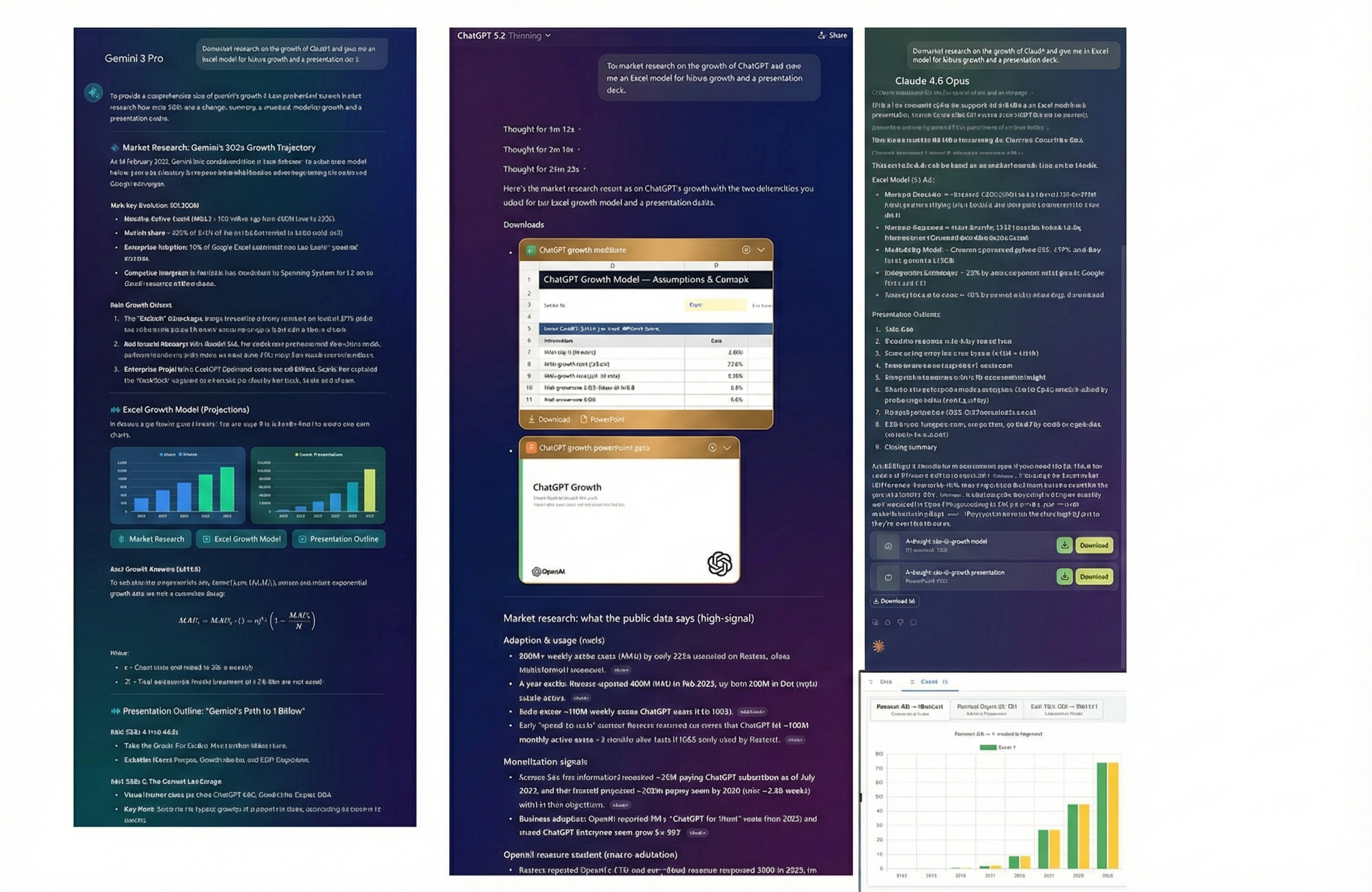
Now, the “same model” can feel completely different depending on the harness it runs in. Claude Opus 4.6 in a basic chat window is not the same as Claude Opus 4.6 inside Claude Code, quietly writing and testing software for hours. GPT‑5.2 answering a single question is not the same as GPT‑5.2 Thinking, clicking through websites and building you a slide deck.
This means “Which AI should I use?” is now a harder question. The answer depends on what you want to get done.
The Models Today
The top models are all very strong and make fewer mistakes than earlier versions. To use them seriously, you usually need to pay around $20 a month, though prices and plans can vary by region.
Paying gives you two big things: access to the best models and apps, and the ability to choose which model you use. Free models are tuned for quick, fun chat, not accuracy. They respond fast, but they’re more likely to be wrong. A lot of “AI fails” online come from people using the free or weaker models.
Today, the three leading frontier models are Claude Opus 4.6, Gemini 3 Pro, and ChatGPT 5.2 Thinking. They all offer modern features like voice, image understanding, code execution, document handling, and (except for Claude) image and video generation. Each has its own style and strengths, but most people can just pick the one they like and be fine.
Other providers exist, but for most users they’re currently behind on models, apps, or harnesses, though there are still niche reasons to choose them.
For casual chatting, smaller or free models are okay. For anything important, choose an advanced model.
Picking the Right Model
Whenever you use an AI app on web or mobile, the most important choice is which model you select. The default is usually fine for light chat, but not for serious work.
In ChatGPT, the default “ChatGPT 5.2” is really an auto mode that can route you to different variants, from weaker mini models up to stronger ones like 5.2 Thinking or 5.2 Pro. Paying lets you choose more powerful versions and control how much the model “thinks” before answering. For complex tasks, you want the deeper-thinking modes, even if they are slower and cost more.
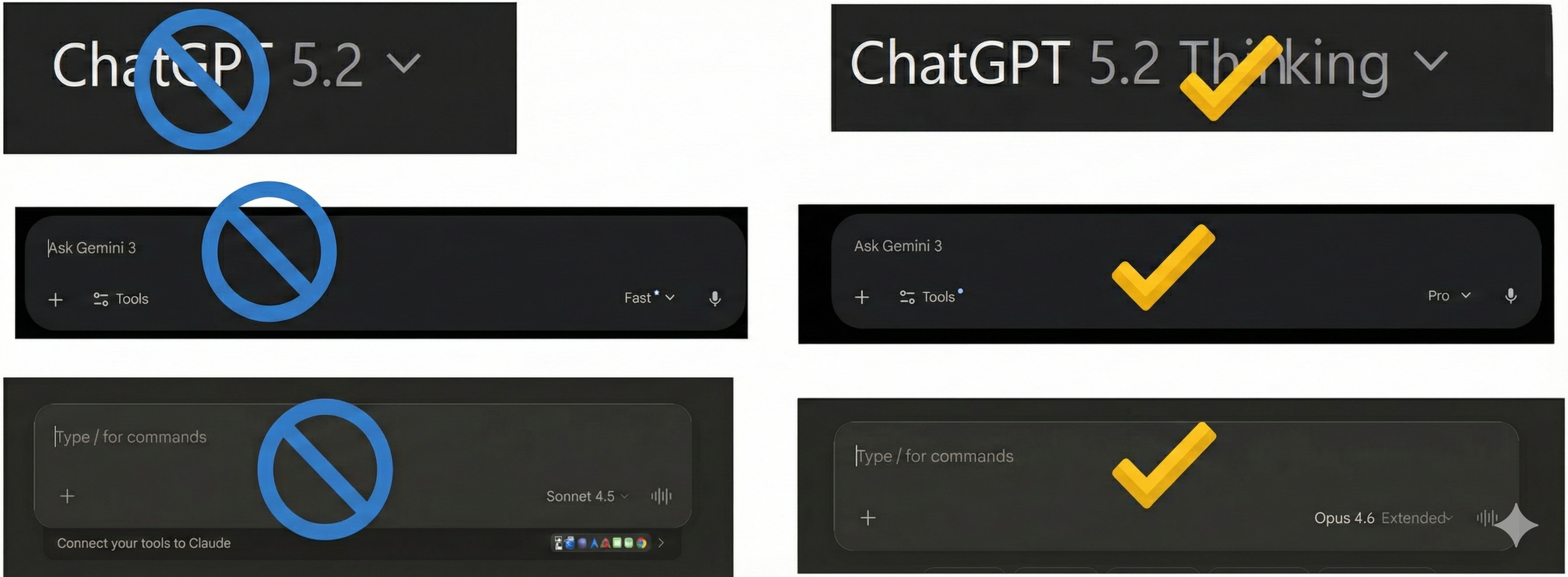
Gemini gives you options like Gemini 3 Flash, Gemini 3 Thinking, and Gemini 3 Pro, with Gemini Deep Think available on some higher-end plans. For serious work, you should pick Gemini 3 Pro or Thinking, and use Deep Think only for very hard problems.
With Claude, you should choose Opus 4.6 for the strongest performance, and you can turn on extended thinking for tougher questions. Sonnet 4.6 is also strong, but still a step below Opus.
At this point, the raw model matters a bit less for most people. The “app” and “harness” often have a bigger impact on what you can actually do.
Chatbot Apps
Most people still use the main chatbot sites or mobile apps for ChatGPT, Claude, and Gemini. These have grown into full-featured apps, and they now differ quite a lot.
Each bundles different tools:
- Gemini’s chatbot gives you access to things like its image and video tools, study helpers, and Deep Research.
- ChatGPT’s chatbot includes image creation, study and quiz tools, research helpers, and more experimental options.
- Claude’s chatbot focuses on Deep Research, with study features available through Projects.
All three can connect to external data like email, calendars, files, and other apps, but each supports a different set of connectors.
This mix of options can feel confusing. For most real work, the most valuable extras are Deep Research and connecting the AI to your own content. But the real game-changer is the harness: which tools the AI can actually control. On this front, ChatGPT and Claude generally offer richer tool access than Gemini’s main website right now. In practice, they can generate working spreadsheets and slide decks with citations, while Gemini’s web app is still more limited.
Beyond Chatbots: Specialized Apps and Harnesses
The main chatbots are where most people start, but the most powerful things often happen in more specialized apps and harnesses.
For coders, tools like Claude Code, OpenAI Codex, and Google Antigravity give the AI access to your codebase, a terminal, and the ability to run and test code by itself. You describe what you want, and the AI tries to build it, reporting back when it’s done or stuck. Even if you don’t code, these deep harnesses can still perform impressive multi-step work.
Claude for Excel and PowerPoint are good examples of harnesses inside familiar tools. They let Claude act like a junior analyst or assistant inside spreadsheets and presentations, making complex work faster while keeping results easy to inspect. Google has some Sheets integration, but not as deep, and OpenAI currently lacks an exact equivalent.
Claude Cowork is something new: a desktop agent for non-technical work. It runs on your computer in an isolated virtual machine, works directly with your files and browser, and can follow multi-step plans like organizing expenses or pulling data from PDFs into a spreadsheet. You describe the outcome; it breaks the work into steps and executes them. It is still a research preview, but it shows where AI is heading: agents that actually do your work, not just talk about it.
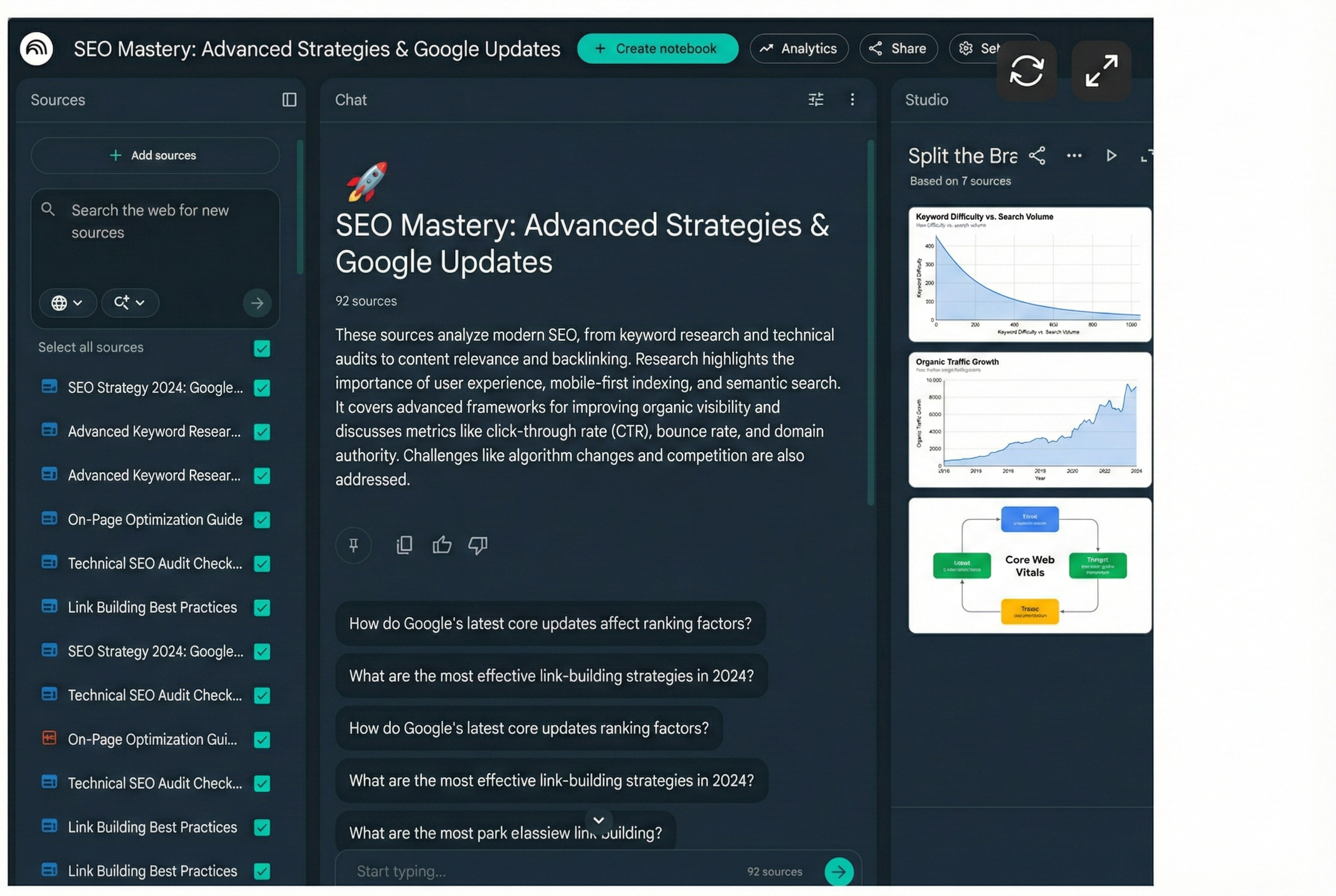
NotebookLM tackles a different problem: making sense of lots of information. You can upload documents, videos, and links, and it builds an interactive knowledge base you can query and turn into slides, mind maps, videos, or even AI-generated “podcasts” that discuss your content. This is especially useful for students, researchers, and anyone working with large piles of documents.
OpenClaw is an experimental open-source agent that runs locally, connects to many models, and acts like a full-time digital assistant that can browse, manage files, send emails, and run commands on your machine. It’s powerful but risky: giving an AI this much access to your computer introduces serious security concerns, so most people should avoid it for now.
What to Do Now
To keep things simple:
- If you’re new, pick ChatGPT, Claude, or Gemini, pay for the advanced plan if you can, and select the strongest model available.
- Use it on real work: upload a real document, give it a detailed task, and iterate with it. You will learn more by doing than by reading guides.
If you’re already comfortable with basic chatbots, start exploring the specialized apps. NotebookLM is free and easy to try, especially for research-heavy work. If you want to go deeper, Anthropic’s stack — Claude Code, Claude Cowork, and the Excel/PowerPoint tools — currently offers some of the strongest agent-style capabilities. Again, don’t just test them with toy prompts; use them on real tasks you care about.
The shift from simple chatbots to true agents is the biggest change in AI since ChatGPT launched. These tools are still early, sometimes confusing, and they will still make strange mistakes. But an AI that “does” work is far more useful than an AI that only “talks” about work, and learning to use it that way is worth the effort.
Download the Full Guide
Want to keep this guide handy? Download the complete PDF version:
📄 Download: From Chatbots to Agents — Picking the Best AI for Your Workflow 2026 (PDF)
Have questions about choosing the right AI for your workflow? Feel free to reach out for a consultation.